Deployment
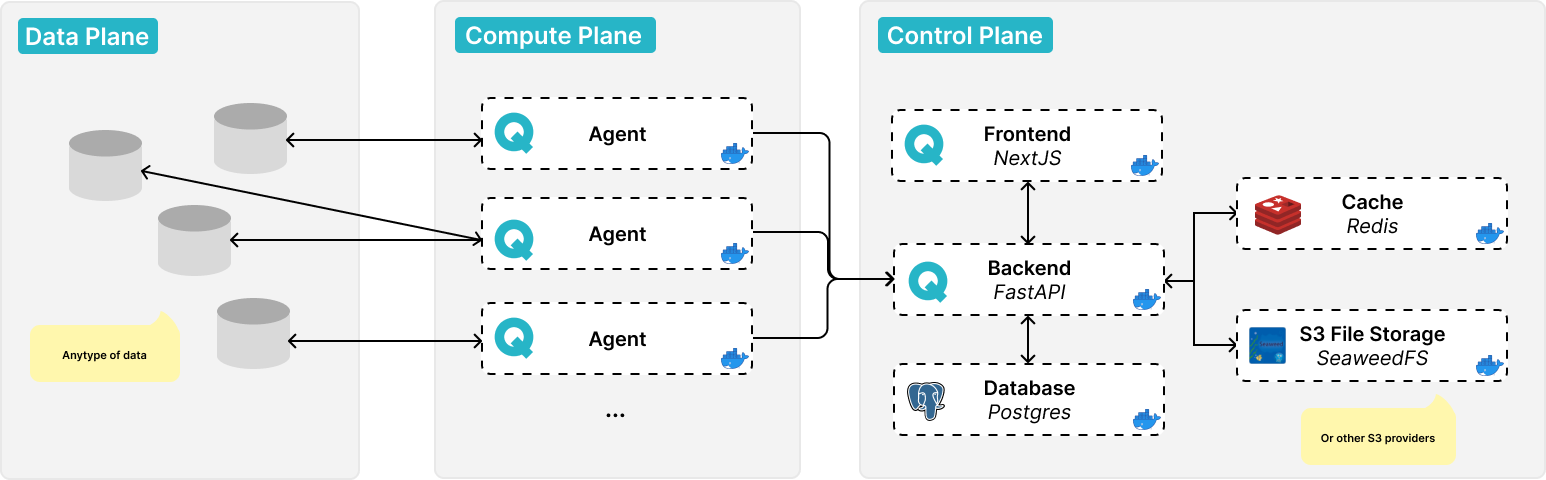
QALITA platform software architecture diagram
Find more details about qalita platform architecture.
A valid license is mandatory: the credentials are used to authenticate to the QALITA registry, which is how the platform validates the license (see how license validation works).
Requirements
Compute
The platform's control plane includes the frontend with its backend and documentation. It requires minimal compute power.
| OS | CPU | RAM | Storage |
|---|---|---|---|
| linux/amd64 | 4 vCPU | 16 GiB RAM | 100 GiB SSD Fast Storage |
| Usage | Memory | CPU |
|---|---|---|
| Idle | 500 MiB | 0.5 |
| In Use | 2 GiB | 1 |
| Optimal | 4 GiB | 2 |
Storage
Storage includes:
- The
PostgreSQLrelational database contains platform management data, metrics, and user activity logs. - The
Rediscache accelerates the interface and backend queries. SeaweedFSstorage includes task logs and assets (pack archives).
| Usage | PostgreSQL | SeaweedFS |
|---|---|---|
| Minimal | 1 GiB | 1 GiB |
| Depends on metrics volume and analysis frequency | 10+ GiB | 10+ GiB |
Network Matrix
| Component | Ingress | Service:Port | Pod |
|---|---|---|---|
| Backend Database | -- | qalita-postgresql:5432 | qalita-postgresql-0 |
| Backend Caching | -- | qalita-redis-master:6379 | qalita-redis-master-0 |
| Backend Object Storage | -- | seaweedfs-s3:8333 | seaweedfs |
| Backend Server | api.domain.com | qalita-backend-service:3080 | qalita-backend |
| Documentation | doc.domain.com | qalita-doc-service:80 | qalita-doc |
| Frontend | domain.com | qalita-frontend-service:3000 | qalita-frontend |
QALITA Workers must be able to communicate with the backend of the control plane. Ensure network access to the backend's Ingress Point (endpoint or URL)!
Cloud SaaS
QALITA Platform offers a fully managed solution hosted on European HDS and SecNumCloud.
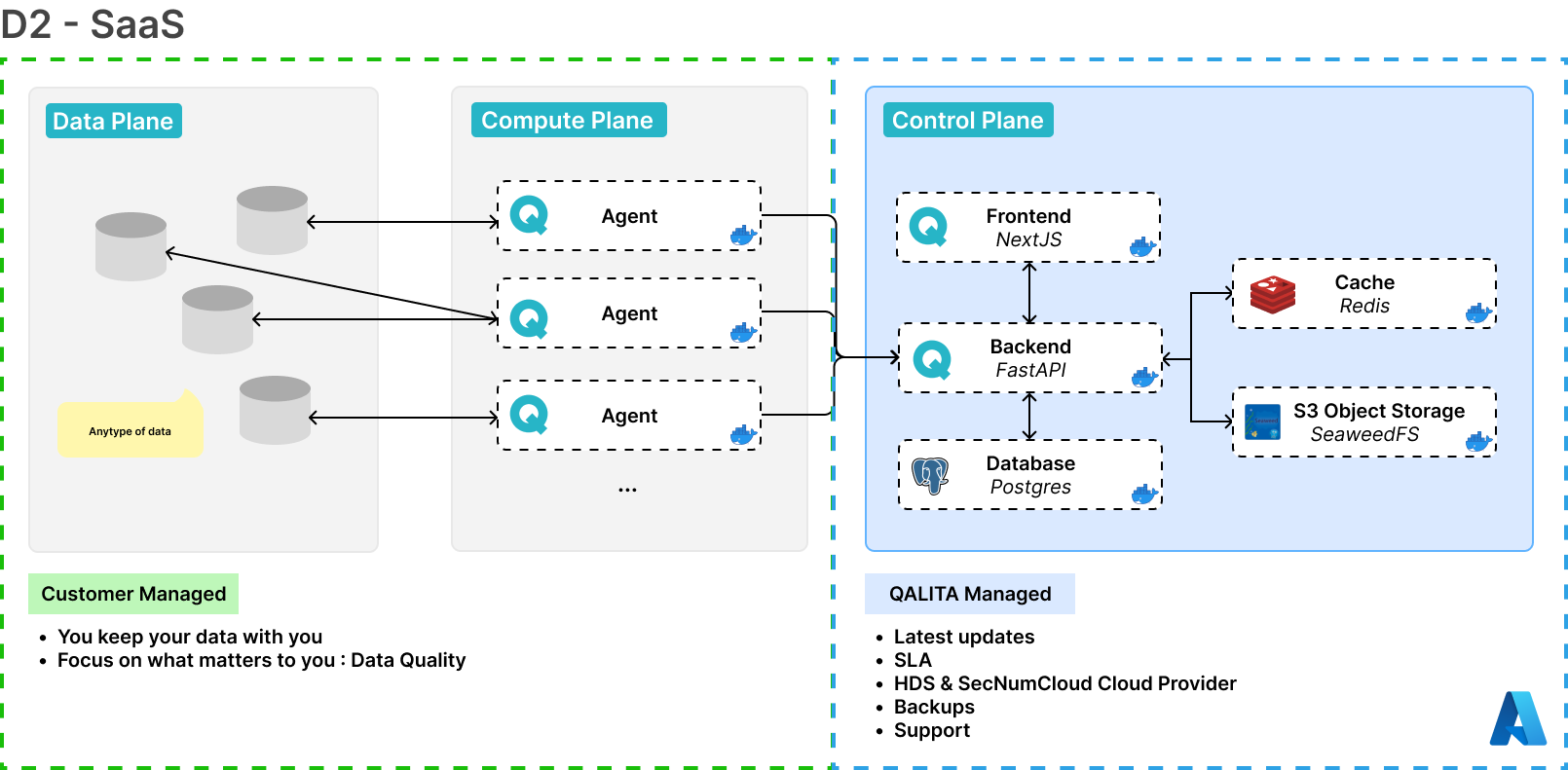
QALITA platform architecture in SaaS mode
Kubernetes
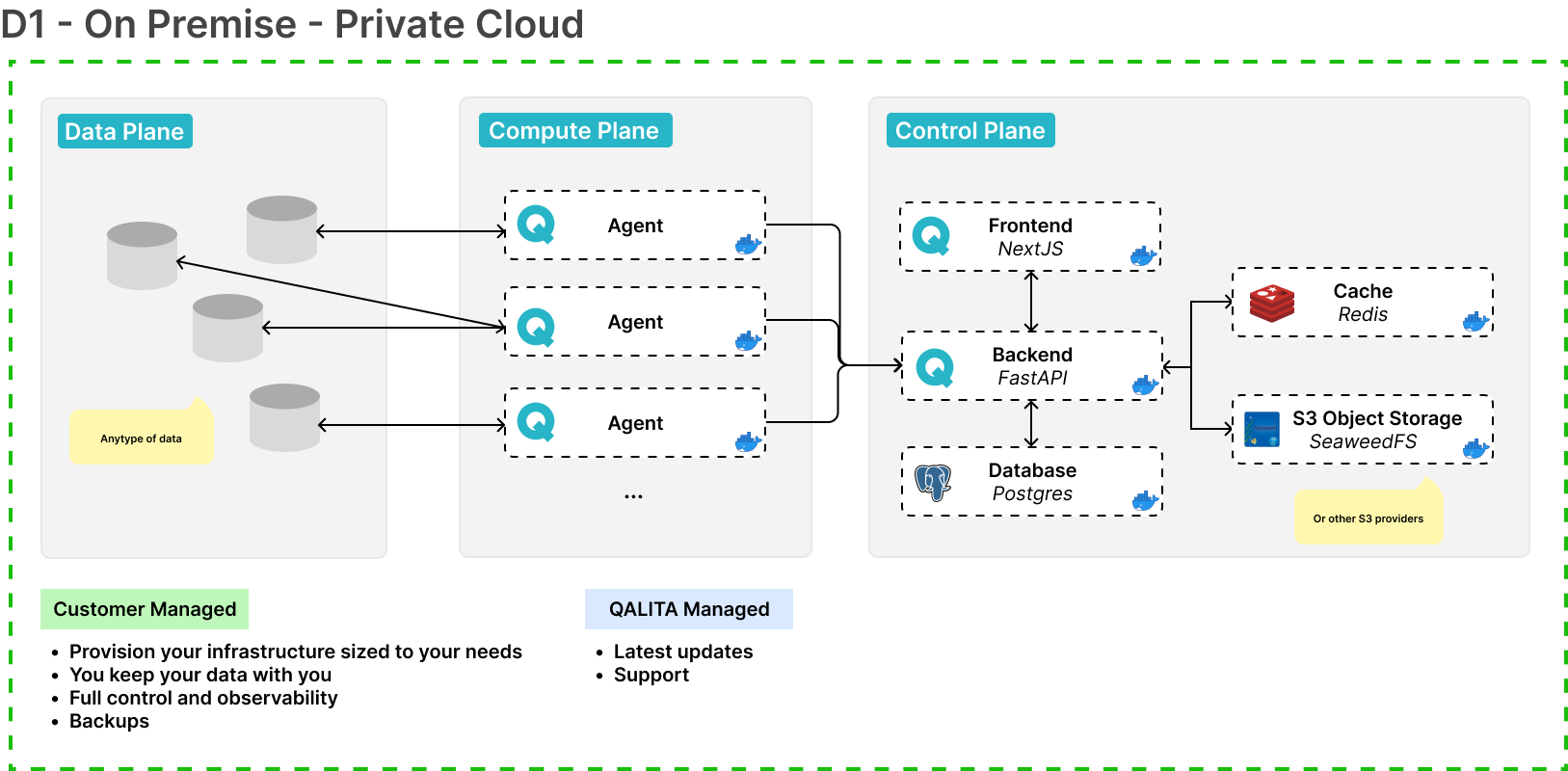
QALITA platform architecture deployed on Kubernetes
Requirements
To deploy on a managed Kubernetes cluster, you will need:
- A Kubernetes cluster
- Kubernetes
1.24+ - Helm
3.0+ - Cert-Manager
1.0+
Dependencies
Helm Chart
For the most up-to-date Helm chart documentation: Go directly to ArtifactHub
1. Create a Namespace
Create a qalita namespace in your Kubernetes cluster.
2. Add the Chart Repository
helm repo add qalita https://helm.qalita.io/
helm repo update
3. Resolve Dependencies
helm dependency update
4. Install
You must override the default configuration using a values.yaml file.
You will need to modify the values to best fit your organization. See an example values file
helm install qalita qalita/qalita -f values.yaml
5. Usage
The chart deploys the following resources:
- QALITA Application
- QALITA API
- QALITA Documentation
- QALITA PostgreSQL Database
- QALITA Redis Cache Database
- QALITA S3 Storage SeaweedFS
With cluster.domain=example.com, the following endpoints are created:
Values
For production use, it is highly recommended to deploy the platform on a managed Kubernetes cluster. QALITA offers a fully managed solution hosted on European HDS and SecNumCloud. Contact us
Docker Compose
See the tutorial: Docker Compose Deployment
Custom CA Certificates (internal PKI)
On-premise deployments often reach services signed by a private Certificate Authority: an internal LLM endpoint, an SMTP relay, or a TLS-intercepting egress proxy. The backend validates those certificates against the public CA bundle, so an unknown issuer fails with:
[SSL: CERTIFICATE_VERIFY_FAILED] certificate verify failed: unable to get local issuer certificate
This is what you see in Settings > AI when testing an LLM configuration whose endpoint is served by an internal PKI.
1. Identify the missing certificate
openssl s_client -showcerts -connect llm.internal.example.org:443 \
  -servername llm.internal.example.org </dev/null 2>&1 \
  | grep -E "^ [0-9] s:|^ [0-9] i:|Verify return code"
| Observation | Cause | What to collect |
|---|---|---|
| A single certificate, issued by a known public CA | Incomplete chain served | The intermediate certificate |
| Issuer is an internal name | Private PKI | Root and intermediate |
| Issuer is the egress proxy | TLS interception | The proxy CA |
Python does not fetch missing intermediates through the AIA extension, unlike web browsers. If the server does not serve its intermediate certificate, adding only the root CA will not fix the error — the intermediate itself must be provided.
2. Provide the certificates to the backend
PEM files named *.crt or *.pem placed in /etc/qalita/ca-certificates are merged with the
public CA bundle when the container starts, and exported through SSL_CERT_FILE and
REQUESTS_CA_BUNDLE. Merging (rather than replacing) keeps public CAs trusted, so the license
registry and cloud providers keep working.
Kubernetes
kubectl create secret generic qalita-ca-bundle \
  --namespace qalita-platform \
  --from-file=internal-root.crt \
  --from-file=internal-intermediate.crt
backend:
  caBundle:
    existingSecret: qalita-ca-bundle
Docker Compose
backend:
  volumes:
    - ./backend/certs:/etc/qalita/ca-certificates:ro
The mount path can be changed with backend.caBundle.mountPath (Helm) or the
QALITA_CA_CERTS_DIR environment variable; the merged bundle is written to /tmp and can be
relocated with QALITA_CA_BUNDLE.
3. Verify
The backend logs the certificates it trusts at startup:
>> TLS Trust Store Check
>> Trusting custom CA: /etc/qalita/ca-certificates/internal-root.crt
>> Custom CA bundle ready: /tmp/qalita-ca-bundle.crt
Then test the endpoint from inside the container:
kubectl exec deploy/<release>-backend -- \
  python -c "import httpx; print(httpx.get('https://llm.internal.example.org/models').status_code)"
Retesting the configuration in Settings > AI should now succeed.